Nvidia Shield TV Pro Review
Six years old and still the most powerful streaming box on the market.
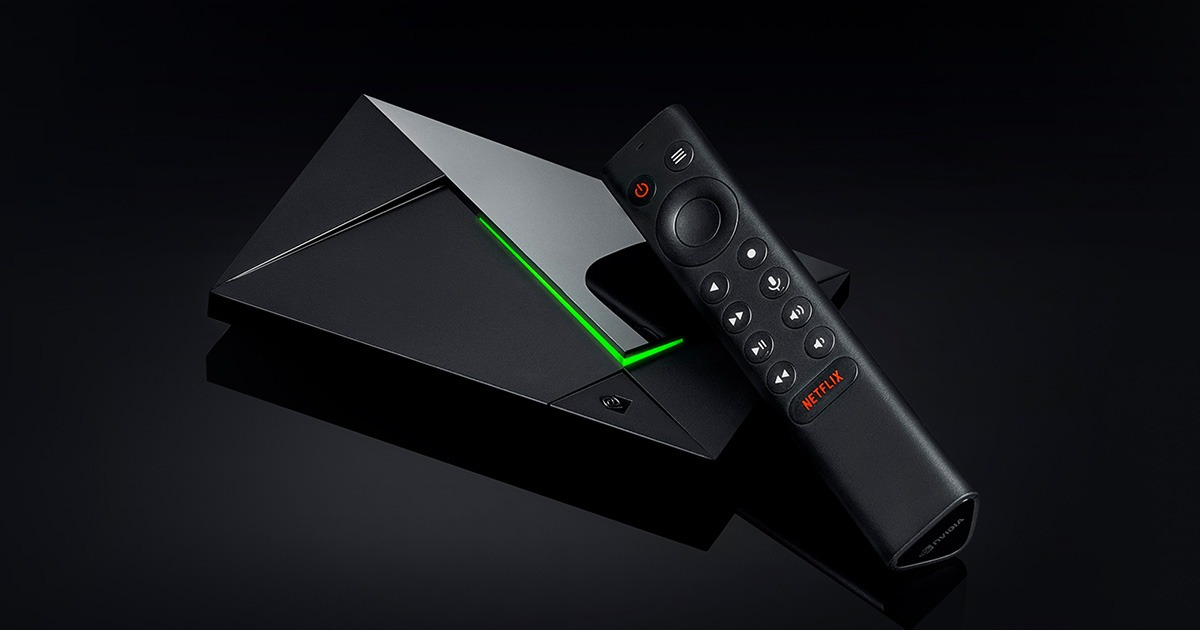




Our Take
The Nvidia Shield TV Pro has been in client racks since 2019 — long enough to know exactly who it works for, and who should pass. If you run a Plex media server, cloud-game from the couch, or want AI upscaling that genuinely helps older content, this is the right box. For everyone else, it's overkill.
What you're really paying for is headroom. Nvidia built the Shield with so much processing power that a six-year-old box still feels current. The interface stays smooth, modern codecs decode in hardware, and Nvidia continues to push Android TV updates years after most competing boxes have stopped getting them.
The age does show in one spec: Wi-Fi 5, when every other premium streamer is on Wi-Fi 6 or 6E by 2026. Plug into the built-in Gigabit Ethernet port and that complaint goes away. For the user who actually needs what the Shield does, this is still the right $200. For everyone else, the Roku Ultra streams just as well for half the price.
When to buy it
You run a Plex media server. The Shield is the most reliable Plex client made and one of the only streamers that can also host the Plex Media Server itself. Hardware-decodes every modern codec, transcodes 4K HDR for remote streaming, and never stutters on the largest libraries. Apple TV and Roku run Plex too, but the Shield is built for it.
You cloud-game on the couch. Nvidia's GeForce Now runs natively on the Shield. Pair an Xbox or PS5 controller, subscribe to the Ultimate tier, and you're streaming RTX-class games to your TV without owning a $1,500 console. Wired Ethernet is required for the experience to feel right.
You have a library of older content. The Shield's AI upscaling genuinely improves 1080p content on a 4K display. Old DVDs and Blu-ray rips look noticeably sharper. It's not magic — won't make 480p YouTube look like 4K — but on 1080p source material the difference is real.
You want both Dolby Atmos and DTS:X passthrough. Most streamers handle Atmos but skip DTS:X. The Shield handles both. If your AVR or soundbar supports DTS:X (most modern ones do), this is one of the only streamers that won't bottleneck the audio.
You're a retro emulation hobbyist. Native Android TV runs every emulator out there. The Shield's GPU handles up to PS2 and GameCube smoothly — nothing in the streamer-sized form factor comes close.
You hate replacing devices. The Shield is six years into its life and Nvidia is still pushing major Android TV updates. No other streaming box has that support record. Apple TV is close. Everything else cycles faster.
When to skip it
You just want to watch Netflix. The Shield is overkill. The Roku Ultra does the same streaming job for $100 less and has a better remote.
You're in the Apple ecosystem. No AirPlay, no HomeKit. If your house runs on iPhones, the Apple TV 4K is the obvious pick — different price, different audience.
You prefer a clean home screen. Android TV is the busiest interface among major streamers — content rows from multiple services and sponsored suggestions from Google. Apple TV's home screen is the cleanest. Roku is in the middle.
You can't run Ethernet to the TV. The Shield's Wi-Fi 5 is its biggest dated spec. With Ethernet it doesn't matter at all. Without it, in a dense apartment building, the newer Wi-Fi 6 and 6E streamers handle interference better.
Key features (and what they actually mean for you)
Tegra X1+ chip — overbuilt from day one
The Shield uses Nvidia's Tegra X1+ processor with a 256-core GPU. For a streaming device, this is laughable overkill — and it's why a six-year-old box still feels new.
🚀 Why this matters: when the Shield launched, it was lapping every competitor in raw processing power. Nothing since has fully caught up at this price point. The reason this box has aged so well is because Nvidia built it for years of headroom.
AI Enhanced Upscaling — old content, sharper image
The Shield uses its GPU to upscale 1080p (and lower) content closer to 4K quality. Better than basic bilinear upscaling that other devices use.
✨ In plain English: if you have a library of 1080p Blu-ray rips, old DVDs, or downloaded TV shows from before 4K was a thing — the Shield's AI upscaling makes them look noticeably sharper on a 4K TV. Subtle on modern 4K content; striking on older 1080p source material.
Full Dolby Atmos AND DTS:X audio passthrough
Most streamers handle Atmos but not DTS:X. The Shield handles both, plus Dolby Digital and DTS legacy formats.
🔊 In plain English: Atmos is the surround-sound standard Netflix and Disney+ use. DTS:X is the competing standard some Blu-rays and physical media use. If you've spent on a real surround system that supports both, the Shield is one of the few streamers that won't bottleneck the audio.
Gigabit Ethernet — wired streaming at full speed
Built-in Gigabit Ethernet, no adapter required. This is the spec that saves the Shield from its dated Wi-Fi 5.
16 GB internal storage + USB expansion
Two USB 3.0 ports for external drives. Hold a library of games, emulator ROMs, or downloaded content for travel. Plex Media Server can run from the Shield's internal storage or an attached USB drive.
Plex Media Server support
The Shield is one of the only streaming devices that can HOST a Plex server, not just play one. If you've got a hard drive full of movies or TV recordings, plug it in and the Shield becomes your media server for the whole house.
📦 Why this matters: most Plex setups require a dedicated computer running 24/7 in a closet somewhere. The Shield can serve as both the server and the client in one box — saves you the hardware AND the electricity bill of a separate server.
GeForce Now cloud gaming
Free tier for casual gaming. $20/mo Ultimate tier streams RTX 4080-class games at 4K 120fps from Nvidia's servers to your TV. Works astonishingly well on wired internet.
The Shield Remote — backlit and functional, with one weird design choice
The Shield's remote is triangular (love it or hate it), aluminum, dense, well-built. Has backlit buttons that glow when you press them in a dark room — only the Roku Voice Remote Pro 2 also offers this in the under-$200 streamer category.
It has voice search via Google Assistant, a Netflix shortcut button, programmable button for any app, and runs on a button cell battery that lasts about a year. No headphone jack. No lost-remote finder.
| Remote feature | Shield Remote | Roku Voice Remote Pro 2 | Apple Siri Remote |
|---|---|---|---|
| Voice search across apps | ✓ Google Assistant | ✓ "Hey Roku" hands-free | ✓ Siri (press to talk) |
| Headphone jack on remote | ✗ | ✓ | ✗ |
| Lost-remote finder | ✗ | ✓ | ✗ |
| Backlit buttons | ✓ | ✓ | ✗ |
| Customizable shortcut button | ✓ (1) | ✓ (2) | ✗ |
| Battery / charging | Button cell (~1 yr) | Rechargeable USB-C | Built-in rechargeable, USB-C |
| Universal remote (controls TV) | ✓ via IR + CEC | ✓ Most TVs | ✓ Built-in IR + CEC |
The triangular shape is the Shield's most divisive design choice. Some clients love it (feels distinctive in the hand). Some clients hate it (rolls weirdly on side tables). One thing it's not: easy to lose, because it doesn't fit in standard remote-shaped places.
Closed captions, parental controls, and accessibility
Android TV's accessibility features apply — TalkBack screen reader, font size controls, color correction modes. Closed captions are customizable but the controls are buried deeper than they are on Apple TV.
Parental controls work via Google's Family Link, which is solid for kid profiles but more setup-heavy than Roku's or Apple TV's per-device PIN. If you're already a Google household with Family Link configured, this is seamless. If you're not, expect a 30-minute setup process to lock down kid content.
The Shield supports voice control via Google Assistant on the remote (not hands-free like Fire TV Cube or Google TV Streamer — you have to press the button).
What's missing
Wi-Fi 5 is the single dated spec. Every other premium streamer is on Wi-Fi 6 or 6E by 2026. Plug into Ethernet and you'll never notice. Without Ethernet, this is genuinely a problem in a dense apartment building.
Android TV interface looks dated next to Apple TV or Google TV. Functional, not pretty. Content rows everywhere, sponsored recommendations from Google. If you came from an iPhone, the UI will feel busy.
No new flagship from Nvidia in years. The Shield Pro is still the current model six years after release. The fact that it's still the best says good things about the original design — but it's worth knowing there's no successor announced and the box's eventual replacement schedule is unclear.
$200 is the highest streaming-box price on the market. Twice the Roku Ultra. $70 more than the Apple TV 4K base. The premium only earns its keep if you actually use Plex, gaming, or AI upscaling. Otherwise it's expensive for what it does.
No Dolby Vision IQ. The Shield supports Dolby Vision content but doesn't have the ambient-light sensor that Apple TV uses to adjust HDR output for room brightness. Minor in most living rooms.
Limited cable provider apps. Xfinity Stream and Fios TV App work but feel like ports. Roku's cable-app integrations are tighter — if you're keeping cable alongside streaming, Roku handles that combination better.
More photos
Ready to buy?
Price is the same at every retailer — pick whoever you already shop with. Free shipping at most.
Setup tips from a pro installer 8 tips · click to expand
- Plug in Ethernet, always The Shield has Gigabit Ethernet — use it. Wi-Fi 5 is the one truly dated spec, and wired bypasses the issue entirely.
- Enable AI Enhanced upscaling Settings → Device Preferences → Picture → AI Enhanced Resolution → ON. Off by default. Genuinely sharper image on 1080p content — the single most impactful setting.
- Set audio output to 'Auto' Settings → Device Preferences → Sound → Surround Sound → 'Auto.' Lets the Shield pass through Dolby Atmos AND DTS:X to a capable AVR.
- Install Plex Media Server (not just the client) If you have a hard drive of movies or TV recordings, install the Plex Media Server app directly on the Shield. It can host your library AND play it on the TV — no separate server needed.
- Pair a controller for gaming and emulation Bluetooth pair a PS5, Xbox Series, or 8BitDo controller. Once paired, every game and emulator works with it. The Shield supports more controllers natively than any other streamer.
- Set up GeForce Now if you want to cloud-game Free tier works for casual gaming. The $10-20/mo Priority and Ultimate tiers stream RTX-class games over the internet — works shockingly well on a wired Shield.
- Disable home-screen content rows you don't use Settings → Device Preferences → Home Screen → choose which content rows show up. Cleans up the cluttered Android TV layout meaningfully.
- Update Android TV when prompted Nvidia still pushes major Android TV updates to the Shield 6 years after launch — better support cycle than any competing streaming box. Don't skip them.