Google TV Streamer (4K) Review
Google's first real streaming box — and the cheapest smart-home hub on the market.





Our Take
After a decade of Chromecast iterations, Google finally shipped a streaming box worth the upgrade. The Google TV Streamer is what the Chromecast should have been from the start — proper remote, built-in Gigabit Ethernet, 32 GB of storage, and a real interface designed for the TV. For Google households, this is the right pick.
What separates it from every other $99 streamer is the smart-home story. The Streamer is both a Matter controller and a Thread border router — the two protocols that run the modern smart home. A standalone Matter/Thread hub from Apple, Aqara, or Eve runs $80–$150 by itself. Here you get one alongside a 4K streaming box for the same money.
The streaming itself is competent but not exceptional. The interface is heavier on sponsored content than Apple TV or Roku, and Wi-Fi 5 is the one truly dated spec on the box. Plug in Ethernet and the Wi-Fi complaint goes away — but if you're not in the Google ecosystem and don't need the hub features, the Roku Ultra has a better remote at the same price.
When to buy it
Most people in your house use Google products. Pixel phones, Nest thermostat, Nest doorbell, Google Home speakers. The Streamer slots into Google Home the way Apple TV slots into HomeKit — "Hey Google, show me the front door" pops the Nest feed onto the TV instantly. The integrations are seamless.
You're building a Matter + Thread smart home. Matter is the new universal smart-home standard and Thread is the low-power radio that runs your sensors and locks. The Streamer is both a Matter controller AND a Thread border router — no other $99 streaming box is either. This is the cheapest legitimate hub on the market.
You watch a lot of YouTube and YouTube TV. Both are Google products and both feel native here. YouTube TV's interface on the Streamer is the smoothest on any streaming box. Voice control via Google Assistant means "Hey Google, record this show" actually works the way you'd expect.
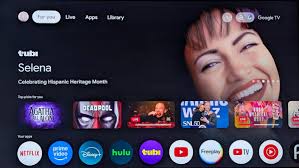
You want content recommendations across every service. The Google TV interface aggregates Netflix, Disney+, Max, Prime Video, Apple TV+, and Hulu into a single home screen. You browse "what's new" without app-hopping. Roku and Apple TV keep you inside individual apps. Google TV is the only interface that genuinely cross-shops everything.
You're upgrading from an older Chromecast. If you've been using a Chromecast with Google TV dongle or any older Chromecast, this is the natural next step. Same interface you already know, but with Ethernet, storage that doesn't run out, a real remote, and smart-home hub features the dongle never had.
You want hands-free voice control. Google Assistant works hands-free on the Streamer with a built-in mic, or via the remote button — your choice. Apple TV requires the remote every time. Roku requires a press unless you own a Roku speaker.
When to skip it
Your house has iPhones. AirPlay, HomeKit, iCloud Photo sharing — none of that works here. If your family wants to send photos and videos from iPhones to the TV, the Apple TV is the obvious pick. Different price, different audience.
You hate sponsored content on the home screen. Google TV's home page surfaces sponsored "Top picks for you" rows and content tiles you can't fully turn off. Apple TV is the cleanest home screen of any major streamer. Roku is in the middle. Google TV and Fire TV are the busiest.
You don't want an always-on microphone. Google Assistant on the Streamer defaults to hands-free listening. You can disable it, but if a mic that's always on bothers you on principle, Apple TV is the only mainstream streamer that doesn't ship with one.
You can't run Ethernet to the TV. Wi-Fi 5 is the Streamer's one truly dated spec. Apple TV is on Wi-Fi 6, Fire TV Cube is on Wi-Fi 6E. With Ethernet, this doesn't matter at all. Without it, in a dense apartment building, this is a real problem.
Key features (and what they actually mean for you)
Matter controller + Thread border router — the $99 smart home hub
The Streamer is the cheapest device on the market that's BOTH a Matter controller and a Thread border router. Most $99 streamers are neither.
🏠 In plain English: Matter is the new universal smart home standard — finally, your Apple HomeKit, Google Home, and Amazon Alexa devices can all talk to each other. Thread is the low-power radio (like Wi-Fi but designed for sensors and locks). The Streamer becomes the central brain that connects all of it. A standalone Matter/Thread hub costs $80–$150 by itself. Here you get one AND a 4K streaming box for $99 total.
Google TV interface — recommendations across apps, not within them
Google TV aggregates content from every major streaming service into one home screen. You browse without picking an app first.
📺 Why this matters: every other streaming box is built around apps — you open Netflix, browse Netflix, then close Netflix and open Hulu. Google TV shows you all the new releases and trending shows across every service you have, in one row. It's the only interface that cross-shops your entire subscription stack.
Gigabit Ethernet built in — the spec that saves the Wi-Fi 5
The Streamer has a Gigabit Ethernet port on the back, no adapter needed.
🔌 Why this matters: Wi-Fi 5 is the one truly dated spec on this box. Every other premium streamer is on Wi-Fi 6 or 6E. The good news is a $10 Ethernet cable bypasses the issue entirely and gives you a faster connection than any wireless standard. If you can run a cable, do it.
32 GB internal storage — finally enough room for apps and games
The previous Chromecast had 8 GB and ran out of space the second you installed a few games. The Streamer has 4× that.
💾 What this solves: if you've ever had a streaming device tell you "not enough storage to install this app," you know the problem. 32 GB is enough room for every major streaming app plus Android TV games, emulators, and offline content downloads.
Dolby Vision, HDR10+, Dolby Atmos passthrough
Every premium picture and audio format used by every major service.
🔊 In plain English: the Streamer handles all the formats. The picture quality matches Apple TV and Fire TV Cube — none of the current premium boxes give up anything here.
Google Home integration — the Streamer as a smart-home dashboard
The Streamer has a dedicated Google Home panel that surfaces your Nest cameras, smart lights, thermostats, and door locks. From the TV.
🎥 Real-world use: doorbell rings, you say "Hey Google, show me the front door," and the Nest feed pops up on the TV. Or you check the Nest thermostat without leaving the couch. Same idea as HomeKit on Apple TV, but for Google's ecosystem.
The Voice Remote — finally a real remote, with one shortcoming
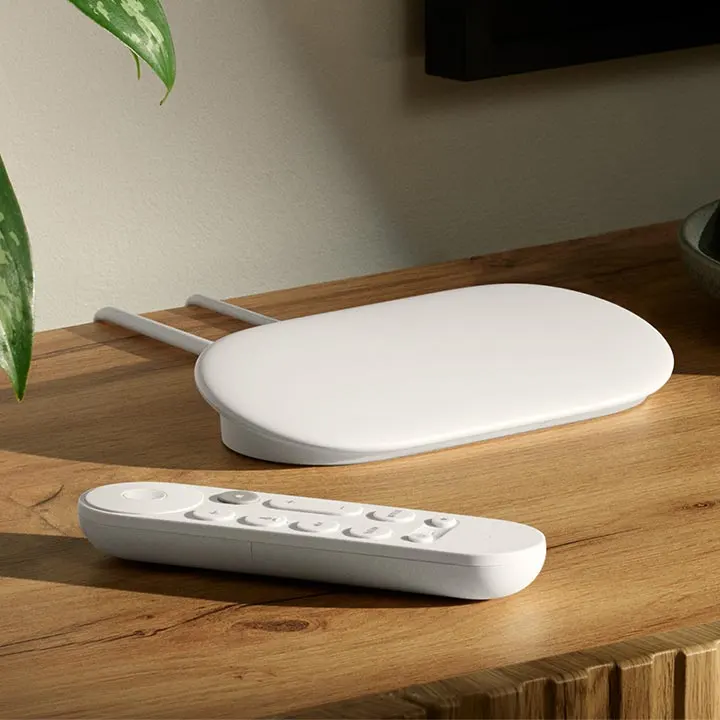
After years of the joke Chromecast remote (which lost itself in couch cushions weekly), Google built the Streamer a proper Voice Remote. It has the basics: Google Assistant voice button, customizable shortcut button, dedicated YouTube and Netflix buttons, volume rocker, and a remote-finder feature so when you press a button on the back of the Streamer box, the remote beeps.
It runs on two AAA batteries (not rechargeable USB-C like Roku) which is a step backwards in 2026, but the batteries last 6+ months so it's a minor gripe. No headphone jack on the remote — the Streamer supports Bluetooth headphone pairing from the box itself, but if you want a 3.5mm jack on the remote, Roku is still the only one that ships it.
The bigger story: the remote is real. You can hold it, find it, use it. After a decade of Chromecast asking you to control the box from your phone, this alone is the upgrade.
| Remote feature | Google Voice Remote | Roku Voice Remote Pro 2 | Apple Siri Remote |
|---|---|---|---|
| Voice search across apps | ✓ Google Assistant | ✓ "Hey Roku" hands-free | ✓ Siri (press to talk) |
| Headphone jack on remote | ✗ | ✓ | ✗ |
| Lost-remote finder | ✓ (button on box) | ✓ | ✗ |
| Backlit buttons | ✗ | ✓ | ✗ |
| Customizable shortcut button | ✓ (1) | ✓ (2) | ✗ |
| Battery / charging | AAA batteries (~6 mo) | Rechargeable USB-C | Built-in rechargeable, USB-C |
| Universal remote (controls TV) | ✓ via IR + CEC | ✓ Most TVs | ✓ Built-in IR + CEC |
The Streamer's remote is the right tier for the price — better than the Chromecast remote ever was, behind Roku's Voice Remote Pro 2 on features. Apple's Siri Remote is the prettier object; the Streamer's remote is the more practical one. Take your pick.
Closed captions, parental controls, and accessibility
Solid. Android TV's full accessibility suite applies — TalkBack screen reader, switch access, font size and contrast controls. Closed captions are fully customizable (font, size, color, background) under Settings → System → Accessibility → Captions.
Parental controls run through Google's Family Link, which is the same system used on Pixel phones and Chromebooks. If you're already a Google household with Family Link set up for kids, it's seamless — kid profiles inherit the same content rules. If you're not, expect a 30-minute setup the first time. After that it's set-and-forget.
Like the Fire TV Cube, the Streamer supports Audio Streaming for Hearing Aids (ASHA) — Bluetooth hearing aids pair directly to the box and TV audio routes to the wearer. Roku and Apple TV don't do this. If hearing aids are part of your household, this is a real differentiator.
Google Assistant works hands-free on the Streamer (built-in mic) OR via the remote button — your choice. Apple TV requires the remote; Roku requires button-press unless you use a Roku speaker. The Streamer matches the Fire TV Cube as the only mainstream streamer with always-listening voice built in.
What's missing
Wi-Fi 5 is the single dated spec. Every other premium streamer is on Wi-Fi 6 or 6E by 2026. Plug into Ethernet and you'll never notice. Without Ethernet, this is the box's main weakness in a dense apartment building.
The home screen pushes sponsored content. Google TV's "Top picks for you" row often includes paid placements for shows Google is promoting. You can disable some recommendation rows but the sponsored ones tend to come back. Apple TV is the cleanest home screen; Roku is in the middle; Google TV and Fire TV are the busiest.
No AirPlay or HomeKit. Google TV is locked out of Apple's ecosystem. If anyone in the house uses iPhones and wants to send photos or videos to the TV, the Streamer can't do it directly. You'd need to install a third-party AirPlay app and it's never as smooth as native Apple TV.
The remote isn't backlit. Roku and Nvidia Shield ship backlit remotes. Streamer doesn't. Annoying in a dark room — you're hunting for buttons by feel.
No Plex Media Server hosting. Plex client works fine on the Streamer, but unlike the Nvidia Shield, it can't host the Plex server itself. If you've got a hard drive full of personal media, the Streamer plays it but doesn't serve it to the rest of the house.
Matter/Thread hub features still maturing. This is the Streamer's flagship feature and it's improved a lot in firmware updates over the last year, but Matter as a standard is still settling. Some devices (especially older smart bulbs and locks) require firmware updates on their end to fully work. Not a Streamer issue — a Matter ecosystem issue — but worth knowing.
More photos
Ready to buy?
Price is the same at every retailer — pick whoever you already shop with. Free shipping at most.
Setup tips from a pro installer 8 tips · click to expand
- Plug in Ethernet The Streamer has Gigabit Ethernet built in. Use it — Wi-Fi 5 is the one dated spec and wired bypasses the issue.
- Sign into your Google account first Content recommendations are night-and-day better when the Streamer knows your YouTube watch history, your Google account preferences, and which apps you've installed across devices. Skip this and the home screen feels generic.
- Enable Matter + Thread under Smart Home setup Settings → Devices → Add Matter Device. The Streamer is a Matter controller AND a Thread border router — most $99 devices aren't either. This is what separates it from every other streaming box.
- Set audio output to 'Auto' Settings → Display & Sound → Sound → 'Auto.' Default is sometimes set to Stereo, which wastes a Dolby Atmos system.
- Customize the Voice Remote shortcut button Long-press the programmable button on the remote. Assign any app — Netflix, Disney+, YouTube TV, whatever you actually use.
- Pair Nest cameras and doorbells Open the Google Home app on your phone, link your Nest devices, then say 'Hey Google, show me the front door' to display Nest camera feeds on your TV. Works seamlessly if you're already in the Nest ecosystem.
- Enable lost-remote finder The Streamer has a remote finder button on the back of the box — press it and the remote beeps. Worth showing whoever you set this up for, especially if they have kids or a partner who hides remotes in the couch.
- Turn off ambient-mode if you don't want art By default the Streamer shows curated art and slideshow content when idle. Settings → Ambient → 'Disabled' if you'd rather the TV just go to sleep.