T-Mobile Home Internet Review
T-Mobile's 5G fixed-wireless home internet — when it's a steal, when it's a hassle, and how to know which one your house gets.

Our Take
T-Mobile Home Internet is one of the most disruptive things to happen to the residential ISP market in a decade. I've installed it in dozens of homes — older houses, rural addresses, apartments where the only cable option was a $100/month Spectrum plan that throttled at peak hours, condos where the building wouldn't let us pull fiber. In most of those installs, T-Mobile cut the monthly bill in half and the customer didn't notice any meaningful drop in performance for normal household use.
The reason it doesn't get more love from the AV crowd is that it isn't fiber. Speeds vary by hour. Latency is higher than wired internet. Gateway placement matters in a way that wired internet doesn't. Tower congestion in dense cities can drop your evening speeds to DSL-era performance. But for the household that streams Netflix, runs a couple of laptops, and doesn't competitive-game, T-Mobile Home Internet delivers more than enough internet at half the cable price.
The decision tree is simple. If fiber is lit at your address and it's $80 or less, go fiber. If fiber isn't there and you're paying $80+ for cable, try T-Mobile during their 15-day trial period — test it during your actual peak-use hours, and if it holds up, switch. The savings over a year typically run $300–$500.
The biggest daily frustration — peak-hour speed dips
Every ISP has one. T-Mobile's is the 6 PM–10 PM speed dip. The 5G network shares bandwidth with mobile phone customers, and the network prioritizes phone service. When the local tower is congested — which it often is between 6 and 10 PM in suburban and urban markets — Home Internet speeds drop noticeably. A house that gets 250 Mbps at 2 AM might drop to 40 Mbps at 8 PM.
Forty Mbps is still enough for a 4K Netflix stream plus a Zoom call plus a kid on YouTube. But it's not enough for two 4K streams plus a cloud upload plus a competitive game session. Households that stack heavy use at peak hours feel this. Households that don't, never notice.
The fix is partial — pick a tier with priority data (Amplified or All-In), or move the gateway closer to a window. The real fix is that fiber doesn't have this problem. Knowing that going in keeps the disappointment manageable.
When T-Mobile Home Internet is the right call
- You're paying $80+ for cable internet and not getting more than 200 Mbps usable. This is the biggest case. T-Mobile at $50–$60/month with 50–300 Mbps typical speeds beats cable's $90+/month for similar real-world performance. Run a speedtest at your peak hours during the T-Mobile trial; if it holds, you save $300+/year.
- Fiber is not lit at your address. AT&T, Verizon, Frontier, CenturyLink — if none of them serves your block, T-Mobile Home Internet is usually the next-best option after cable. It often costs half what cable does.
- You're in a small or medium home (under 2,500 sq ft) with the gateway near a window. T-Mobile's gateway needs line-of-sight to a cell tower to perform. Small homes near tower coverage are the sweet spot.
- Your internet use is normal household use — streaming, work, browsing, occasional Zoom. Not competitive gaming, not large cloud uploads, not 4K live streaming as a creator. For normal use it's transparent.
- You want to skip the installer and the truck-roll. T-Mobile is self-install in 15 minutes. No tech in the house, no buried-cable work, no two-hour appointment window. The gateway ships, you plug it in, you're online.
- You're a renter or in a building where wired internet is restricted. Apartment buildings, condos, HOAs that won't let you pull fiber — T-Mobile doesn't need any wiring. Self-install means no landlord coordination.
When to consider another ISP
- You compete-game or stream as a creator. Latency on T-Mobile is 30–60 ms typical, sometimes worse. Fiber is 5–15 ms. The difference doesn't matter for Netflix but it matters a lot for Valorant, Twitch streaming, or anyone who notices micro-delays on calls.
- Your house is large or has dead zones. The gateway's built-in Wi-Fi is fine for an apartment, mediocre for a 3,000 sq ft house. You'll want to run Ethernet to a proper mesh system, and even then performance depends on where the gateway can sit in the house.
- Peak-hour tower congestion is severe in your ZIP. If you live near a downtown stadium, a dense urban core, or a tower that's been overloaded, the 6–10 PM speed dip can be unworkable. The 15-day trial is how you find out.
- You need consistent upload speeds for cloud backups or video uploads. T-Mobile uploads are typically 10–35 Mbps and inconsistent. Fiber is symmetrical. If your house pushes a lot of data up, fiber is the answer.
Key features (and what they actually mean for you)
The technology — 5G fixed wireless
T-Mobile Home Internet uses the same 5G network as T-Mobile's phone service. The gateway in your house has a 5G modem that connects to the nearest cell tower, and your Wi-Fi routes off that connection.
🧠 In plain English: Your house's internet is essentially a giant phone hotspot. The gateway is a router with a 5G modem in it. The connection is wireless from your gateway to the nearest cell tower, then fiber the rest of the way. This is why placement matters and why tower congestion affects your speeds.
Speed tiers — what you actually get
T-Mobile has three plans as of 2026:
| Tier | Monthly (AutoPay) | Priority data | Best for |
|---|---|---|---|
| Rely | $50 | Standard | One-line households, basic use |
| Amplified | $60 | Higher priority | Most households, includes Paramount+ |
| All-In | $70 | Highest priority + backup data | Heavy use, prioritized at peak hours |
💡 In plain English: Pay $10 more for Amplified — the bandwidth priority during congestion is worth $10 in better evening performance. The $70 All-In tier only makes sense if your house genuinely hits peak congestion and the $10 jump from Amplified buys you a usable evening.
The gateway — Nokia or Arcadyan, included free
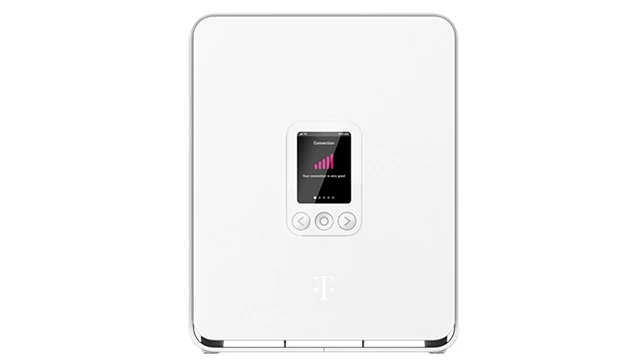
The gateway is a small cylindrical unit (Nokia or Arcadyan, depending on what shipped that month) with the 5G modem and Wi-Fi 6 built in. It's included free with service. No purchase, no monthly equipment fee, no return shipping cost unless you cancel.
The gateway's built-in Wi-Fi covers 1,500 sq ft well, 2,500 sq ft mediocre-to-okay, and anything larger requires Ethernet to your own mesh system.
Install — self-install in 15 minutes
The single best thing about T-Mobile Home Internet is the install model. Box arrives, you plug it in, you walk it around the house with the app to find the strongest signal, you're online. No technician, no truck-roll, no install fee.
Data — no caps, no throttling
Unlimited data, no overages, no contract. The only "soft cap" is the bandwidth priority — heavy users may get slowed during peak congestion if they're on the Rely tier and the tower is busy.
The gateway — fine for most, frustrating for placement-sensitive houses
The gateway has one job: get the strongest 5G signal it can. Where it sits in the house matters more than any other variable. Compared to other 5G Home gateways and standalone routers:
| Feature | T-Mobile Gateway | Verizon 5G Home Gateway | Eero Pro 6E (you-bought) |
|---|---|---|---|
| 5G modem built in | ✓ | ✓ | n/a |
| Wi-Fi 6 | ✓ | ✓ | ✓ (Wi-Fi 6E) |
| Signal-strength app | ✓ (excellent) | ✓ (good) | n/a |
| Wall-mountable | No | Yes | Yes |
| Ethernet ports | 2× 1 Gbps | 2× 1 Gbps | 2× 2.5 Gbps |
| Mesh-capable out of the box | No | Optional | ✓ |
| Coverage area (built-in Wi-Fi) | ~1,500 sq ft | ~2,000 sq ft | ~2,000 sq ft |
| Replacement when it dies | T-Mobile sends one | Verizon sends one | You replace ($200) |
The T-Mobile gateway is unremarkable as a router. Its job is the 5G connection — and at that, it's solid. For Wi-Fi coverage in a real house, plan on running Ethernet to your own mesh system.
Reliability, support, and outages
T-Mobile Home Internet's reliability tracks the local cell tower. In markets where T-Mobile has solid 5G mid-band coverage, it's reliable in the same way fiber is reliable. In markets where coverage is marginal — fringe areas, basements, dense apartment buildings with metal interference — it's flaky.
Support is generally better than cable. T-Mobile's customer service has consistently rated higher than Comcast or Spectrum, and Home Internet inherits that. Tier-1 phone reps are mostly helpful, returns and replacements are painless, and the 15-day trial period eliminates the "stuck with bad service" risk.
Outages are typically tower-related. If the local cell tower has a problem, Home Internet goes with it. Resolutions are usually fast — hours, not days — but during the outage your house has no internet.
The real monthly cost (no surprises)
T-Mobile Home Internet is one of the most honestly-priced internet products in the US.
| Line item | Rely ($50) | Amplified ($60) | Notes |
|---|---|---|---|
| Base price (AutoPay) | $50/mo | $60/mo | Add $5/mo without AutoPay |
| Gateway rental | $0 | $0 | Included |
| Taxes & fees | Included | Included | Truly all-in pricing |
| Realistic monthly | $50/mo | $60/mo | |
| 5-year cost | $3,000 | $3,600 |
💡 The math that actually matters: T-Mobile is roughly half the all-in price of cable internet over five years. For a household that doesn't need fiber-class performance, the savings are massive — $2,000–$3,000 over five years vs Spectrum or Xfinity.
The three real options compared
| Item | T-Mobile Home | Cable Internet (1 Gig) | Verizon 5G Home |
|---|---|---|---|
| Download speed | 50–300 Mbps typical | 940 Mbps | 85–1,000 Mbps |
| Upload speed | 10–35 Mbps | 25–35 Mbps | 10–50 Mbps |
| Latency | 30–60 ms | 15–30 ms | 25–50 ms |
| Data cap | None | 1.2 TB (Xfinity/Cox) | None |
| Install | Self-install, 15 min | Pro install or self-kit | Self-install, 15 min |
| Annual contract | None | None (most) | None |
| Equipment | Included | $14/mo modem rental | Included |
| Realistic monthly | $50–$60/mo | $80–$110/mo | $50–$70/mo with line |
| 5-year cost | ~$3,000 | ~$6,200 | ~$3,200 |
The cable option is the most powerful on paper. T-Mobile is the cheapest. Verizon 5G is the middle path. The right answer depends entirely on which towers reach your address and how busy they are at 8 PM.
What's missing
- Symmetrical upload speeds. T-Mobile's upload is asymmetric and inconsistent. Fiber is the only product that fixes this.
- TV bundling. No TV product included. You pair it with YouTube TV, Hulu + Live, or an antenna.
- Mesh networking included. The gateway alone doesn't cover a large house. Plan to add a mesh system for serious coverage.
- Coverage in marginal areas. If your address is at the edge of 5G coverage, performance varies dramatically. Trial-then-decide is essential here.
Who T-Mobile Home Internet is best for
The right household: paying too much for cable, fiber isn't lit, normal household internet use, in a market with decent T-Mobile 5G coverage. That's a huge slice of the US in 2026. The 15-day trial is the smartest thing T-Mobile did — use it. Test peak-hour speeds, test your actual use cases, and if it holds up, keep the savings.
For households where it fits, T-Mobile Home Internet is the best-value internet product in America. For households where the tower is too far or too congested, it's a frustrating compromise. The trial decides.
More photos
Where to rent
Boxes are rental-only — you cannot purchase them. Rate is per box, per month, billed by Verizon as part of your service.
Setup tips from a pro installer 8 tips · click to expand
- Place the gateway by the window facing the nearest cell tower T-Mobile's gateway has a signal-strength readout in the app. Walk it around the house — sometimes a 10-foot move from the living room to a south-facing window doubles your speeds. This is the single biggest install-day decision.
- Use the T-Mobile Home Internet app to find the best spot The app's signal-strength meter is genuinely useful. Higher bars = faster speeds. The difference between 'fine' and 'great' is usually 8–15 feet of gateway placement.
- Don't put the gateway on the floor or in a basement Height matters. Closer to the ceiling, near a window, away from metal/concrete — every foot of elevation helps. Put it on a bookshelf, not a desk drawer.
- Run Ethernet if you can — Wi-Fi off the gateway is mediocre The gateway's built-in Wi-Fi is fine for a small apartment but underwhelming for a 2,000+ sq ft house. Run Ethernet from the gateway to your own router or mesh system for serious coverage.
- Check for tower congestion at the times you actually use the internet Run speedtest.net at the hours you stream, work, and game — not at 3 AM. Tower congestion peaks 6–10 PM. If speeds tank at peak, you'll know before the 15-day trial period ends.
- Take advantage of the trial period T-Mobile offers a 15-day trial. Use the full trial — test peak hours, video calls, gaming, and 4K streaming. If it fails any of those for your household, return it without paying.
- Add Paramount+ via the Amplified tier if you want it anyway The $60/month Amplified tier includes Paramount+ with ads. If you already pay $8/month for Paramount+, the bundle is essentially free for the extra $2.
- Know that T-Mobile mobile customers get priority bandwidth Home Internet runs on the same 5G network as T-Mobile phones, and mobile customers get bandwidth priority. During congestion, Home Internet slows down before phone service does. This is why peak-hour performance varies.