AT&T Fiber Review
AT&T's fiber internet service — symmetrical speeds, decent gateway hardware, and where it actually beats cable internet in 2026.

Our Take
I've installed and supported AT&T's internet products since the DSL era, and fiber is the first time AT&T has shipped a residential internet product that's genuinely best-in-class. Symmetrical speeds, no data cap on fiber tiers, no annual contract, and pricing that undercuts cable on every tier where both are available. For the homes where I've replaced Spectrum or Xfinity with AT&T Fiber, the upload-speed improvement alone changes how the household uses the internet — video calls don't drop, cloud backups finish overnight instead of taking a week, and the kid streaming Twitch upstairs doesn't kneecap the rest of the house.
The catches are real but smaller than they used to be. The BGW320 gateway is a mediocre router by 2026 standards — Wi-Fi 6E is welcome but the range and the management UI are both fine, not great. Pro install is still the norm even though the connection itself is simple, and the install window can chew up half a day. And the biggest catch is the same as every fiber product: availability is by ZIP, sometimes by block. You can't talk yourself onto the network. Either it's lit at your address or it isn't.
The decision is mostly about whether fiber is actually live at your house and whether the price-for-speed math beats whatever you're paying today. If fiber is live and you're paying $80+ for cable internet at slower symmetrical speeds, AT&T Fiber is almost always the right move. If you're already on a fiber product like Fios or Frontier Fiber, the case to switch is weaker — fiber-to-fiber moves usually only make sense at renewal time when the cheaper promo is on the other side.
The biggest daily frustration — the BGW320 gateway
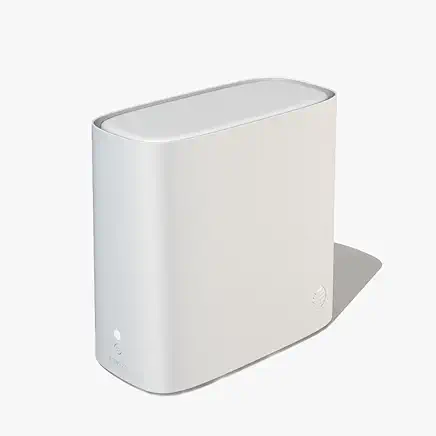
Every ISP has one. AT&T's is the BGW320 gateway. It's not bad, exactly — Wi-Fi 6E is a real upgrade over the previous generation, and for most one-story homes under 2,000 square feet it covers fine. But the moment you have a real house, a real mesh setup, or any prosumer needs, the gateway becomes the friction point. AT&T's firmware doesn't expose the controls power users want, the parental-control UI is laggy, and the gateway is locked-down enough that the obvious move for any AV-savvy household is to put it in IP Passthrough mode and run a real router behind it.
I do this on every install where the customer already owns an Eero, Orbi, or ASUS mesh. The fiber connection is great; the gateway is the part that needs help. AT&T also pushes their $10/month Wi-Fi Extender rental hard at install — for most homes, that's $120/year for a part you can replace with a $200 one-time Eero 3-pack that performs better and costs less over three years.
When AT&T Fiber is the right call
- Fiber is actually lit at your address. The first question. AT&T's fiber map is real, but it's also patchy down to the block level in many cities. Run your address through att.com/internet/fiber/ before you do any other thinking. If it doesn't show fiber availability, the entire decision is over — they'll try to sell you AT&T Internet (DSL or fixed wireless), which is a different product that does not belong on this list.
- You're currently paying $80+ for cable internet. Spectrum, Xfinity, Cox, and Optimum all top out around $80–$110/month for 1 Gbps download with 25–35 Mbps upload, plus equipment fees, plus a data cap in many markets. AT&T Fiber's 1 Gig is $80 flat with symmetrical speeds, no cap, no contract. Apples-to-apples this is usually a $20–$30/month savings the day you switch, before the cable promo expires.
- Someone in the house uploads — Zoom, cloud backups, Twitch, YouTube, photo/video work. Asymmetrical cable upload is the hidden tax of cable internet. AT&T Fiber gives you the same upload as download. For households with a creator, a remote worker, or anyone who regularly pushes large files to the cloud, this single feature is worth the switch.
- You want one fixed price for 12+ months. AT&T Fiber's pricing is more honest than cable. The promo is usually the renewal price, not a 30%-off teaser that doubles in month 13. Cable internet bills creep faster than fiber bills do.
- You can't stand data caps. Xfinity, Cox, and Mediacom all enforce 1.2 TB data caps in most markets, with overages at $10 per 50 GB. A 4K-streaming household with a couple of remote workers can blow past 1.2 TB in 18 days. AT&T Fiber has no data cap on fiber tiers, period.
- You have an AT&T Wireless line already. Bundling drops fiber pricing by $10/month — $120/year. Worth grabbing if you were keeping the wireless line anyway. Not worth switching carriers just to bundle.
When to consider another ISP
- Fiber isn't lit at your address. The dealbreaker. AT&T's non-fiber products (AT&T Internet via DSL or AT&T Internet Air fixed wireless) are a different conversation. If fiber isn't on your block, look at Verizon 5G Home, T-Mobile Home Internet, or whatever cable provider serves your ZIP.
- You already have a great fiber product at a great price. If you're on Verizon Fios at a renewal promo, or Frontier Fiber, or a regional fiber operator like Ziply or Sonic, the case for switching to AT&T is weak. Fiber-to-fiber moves usually only make sense at renewal when the cheaper promo is on the other side.
- You need the install done today. AT&T Fiber installs typically take 7–14 days to schedule, sometimes longer if buried-cable work is required. Cable companies can sometimes self-install you the same day. If you're moving in tomorrow, cable is the bridge product until fiber install can be scheduled.
- You're in a multi-unit building where fiber hasn't been wired to your unit. Even if your building has fiber at the demarc, AT&T can refuse to wire individual units in apartments without landlord coordination. This is one of the most common reasons fiber availability shows yes-then-no after the order is placed.
Key features (and what they actually mean for you)
The technology — symmetrical fiber-to-the-home
AT&T runs fiber-optic cable to the side of your house and terminates it at an Optical Network Terminal (ONT) — a small box mounted on an exterior wall or in your basement. From the ONT, an Ethernet cable runs to the BGW320 gateway inside the house, which then handles Wi-Fi and wired connections.
🧠 In plain English: Fiber-to-the-home means the fiber-optic cable runs all the way to your house, not just to a neighborhood cabinet that then runs old copper the last few hundred feet. This is why AT&T Fiber's speeds are symmetrical and consistent — there's no copper-bottleneck section like there is with cable internet or DSL.
Speed tiers — what you actually get
AT&T offers five fiber speed tiers as of 2026:
| Tier | Download | Upload | Price | Best for |
|---|---|---|---|---|
| Fiber 300 | 300 Mbps | 300 Mbps | $55/mo | 1–2 person households, light streaming |
| Fiber 500 | 500 Mbps | 500 Mbps | $65/mo | Couples, light WFH, 4K streaming |
| Fiber 1 Gig | 940 Mbps | 940 Mbps | $80/mo | Families, multi-device, WFH heavy |
| Fiber 2 Gig | 1.9 Gbps | 1.9 Gbps | $145/mo | Power users, creators, gamers |
| Fiber 5 Gig | 4.7 Gbps | 4.7 Gbps | $245/mo | Pro creators, multi-cam streamers, prosumer-only |
💡 In plain English: Fiber 1 Gig is the sweet spot for almost every household. Going from 300 to 1 Gig is a noticeable upgrade in real-world feel; going from 1 Gig to 2 Gig usually isn't unless someone in the house has a specific reason for it (multi-cam streaming, large daily file uploads). Don't pay for speed you can't notice.
The BGW320 Wi-Fi 6E gateway
The BGW320 is AT&T's current standard gateway. It handles fiber-to-Ethernet termination, Wi-Fi 6E across 2.4 / 5 / 6 GHz, four Gigabit Ethernet ports, and basic security. It's included in your bill at no separate equipment fee.
📡 The honest take: The BGW320 is fine for one-story homes under 2,000 sq ft. For anything bigger or any prosumer use case, put it in IP Passthrough mode and run your own router behind it. AT&T's firmware does the job but the management interface is dated and the controls power users want aren't exposed.
Install — pro install, what to expect
AT&T Fiber install is pro install by default — a technician comes out, runs fiber from the street demarc to the ONT on your house, mounts the ONT, runs Ethernet to wherever you want the gateway, and gets you online. Install windows are typically 4–6 hours but can run longer if buried-cable work is required or if your house needs a new entry point drilled.
Self-install kits exist for some markets (new builds with fiber already pre-wired), but most install is technician-driven. Schedule a day you can be home and don't have other contractors coming the same day.
Data — no caps on fiber tiers
Every AT&T Fiber tier is unlimited data, no cap, no throttling, no overages. This is the single biggest functional difference between fiber and cable in 2026. If you've ever gotten an Xfinity or Cox bill with a data-overage line on it, you know why this matters.
Bundled extras — Max, AT&T Internet Air backup
AT&T bundles HBO/Max with the Fiber 2 Gig and 5 Gig tiers. The Max bundle is real value if you were going to pay for it anyway — saves $16/month, $192/year. If you don't watch Max, the bundle is a wash.
AT&T also offers Internet Air (fixed-wireless 5G) as a backup product in some markets. If your fiber line goes down, the gateway can fall back to a 5G connection until fiber service is restored. Worth knowing about, not worth paying extra for unless you have a critical work-from-home setup.
The gateway — fine for most, frustrating for power users
The BGW320 isn't the worst gateway I've installed. That's not the bar to clear, though. Compared to other ISP gateways and standalone routers, it stacks up like this:
| Feature | AT&T BGW320 | Verizon Fios Router G3100 | Eero Pro 6E (you-bought) |
|---|---|---|---|
| Wi-Fi 6E (6 GHz band) | ✓ | ✓ | ✓ |
| Mesh-capable out of the box | Optional ($10/mo extenders) | ✓ (Fios Extenders) | ✓ |
| IP Passthrough / Bridge mode | ✓ | ✓ | n/a |
| Advanced controls exposed | Limited | More | Full |
| Parental controls | Basic | Decent | Decent |
| Ethernet ports | 4× 1 Gbps + 1× 5 Gbps | 4× 1 Gbps | 2× 2.5 Gbps |
| Replacement when it dies | AT&T sends one | Verizon sends one | You replace it ($200) |
The BGW320 does the basics well and the prosumer stuff badly. For a normal house with normal use, it's transparent — you'll never think about it. For a serious smart home or anyone who knows what double-NAT means, the answer is IP Passthrough mode and a real router behind it.
Reliability, support, and outages
In 28 years of residential installs, the only internet products that came close to fiber for reliability were Verizon Fios (fiber, same category) and the occasional small fiber co-op. Cable internet has a fundamentally noisier physical medium — coax is shared with neighbors, signal degrades with distance from the node, and one bad connector on the block can take down a whole street. Fiber doesn't have those problems.
AT&T Fiber outages, when they happen, are usually upstream — a fiber cut somewhere in the city, a power event at a switching center, or a weather-related issue. They're rare. The bigger reliability story for AT&T Fiber is that ongoing service issues are almost nonexistent compared to cable. I almost never get callbacks from AT&T Fiber customers asking why their internet is slow at 8 PM — the variance just isn't there.
Support is the part where AT&T is still working on it. Tier-1 phone support is hit-or-miss. Tier-2 and field techs are generally solid. If you get a tier-1 rep who's trying to upsell you instead of fixing your issue, ask for tier-2 specifically and the conversation usually changes.
The real monthly cost (you can't escape the fees)
AT&T Fiber's advertised price is closer to the real price than cable's advertised price is — that's a real advantage. But there are still some line items to know about:
| Line item | Fiber 1 Gig | Notes |
|---|---|---|
| Base price (promo, no contract) | $80/mo | Same as renewal price typically |
| Gateway rental | $0 | Included in base price |
| Taxes & FCC fees | ~$3–$5/mo | Varies by state/locality |
| Wi-Fi Extender rental (optional) | $10/mo each | Skip unless coverage is an issue |
| Late payment fee | $9 | Avoid by autopay |
| Realistic monthly | ~$83–$85/mo | If you skip extenders |
| 5-year cost | $5,040 | Assuming no rate hike |
💡 The math that actually matters: AT&T Fiber's all-in price for 1 Gig is roughly $84/month. Spectrum's all-in price for 1 Gbps download (with 35 Mbps upload, no symmetrical, and equipment fees) is closer to $110/month after the promo expires. Over five years, switching to AT&T Fiber saves around $1,500 — and that's before counting the better upload speeds and lack of data cap.
The three real options compared
For most US households where AT&T Fiber is available, the realistic three-way choice is AT&T Fiber, cable internet (Spectrum/Xfinity/Cox depending on your ZIP), or 5G home internet (T-Mobile/Verizon).
| Item | AT&T Fiber 1 Gig | Spectrum / Xfinity Cable Gig | T-Mobile / Verizon 5G Home |
|---|---|---|---|
| Download speed | 940 Mbps | 940 Mbps | 50–415 Mbps typical |
| Upload speed | 940 Mbps | 25–35 Mbps | 10–35 Mbps |
| Latency (typical) | <10 ms | 15–30 ms | 30–60 ms |
| Data cap | None | 1.2 TB (Xfinity/Cox); none (Spectrum) | None |
| Equipment | BGW320 included | $14/mo modem + router | Gateway included |
| Annual contract | None | None (Spectrum) / None (Xfinity 1-yr) | None |
| Install model | Pro install required | Self-install kit common | Self-install in 15 min |
| Reliability | Highest | Mid | Variable by tower |
| Realistic monthly (yr 1) | ~$84/mo | ~$80/mo promo / $110 renewal | ~$50–$70/mo |
| Realistic monthly (yr 2+) | ~$84/mo | ~$110+/mo | ~$50–$70/mo |
| 5-year cost | ~$5,040 | ~$6,200–$6,800 | ~$3,500–$4,200 |
The five-year math is the math that matters. Cable internet looks cheap in year one and gets expensive in years two through five. Fiber starts at the same price and stays there. 5G home is the cheapest of the three but trades latency and speed-consistency for the savings — fine for casual households, painful for gamers or heavy video-call users.
What's missing
- TV bundling. AT&T Fiber is internet-only. AT&T's TV products (DirecTV Stream, U-verse legacy) aren't sold as a single combined plan anymore. If you want TV + internet from one provider, look at Verizon Fios (still bundles), Spectrum (cable + internet), or DirecTV Stream as a separate streaming add-on.
- A real router included. The BGW320 gateway is fine for basics but not a real router. If you want serious Wi-Fi coverage, you're buying an Eero, Orbi, or similar to run behind it. Plan on $200–$400 in extra router cost if you have a larger home.
- Symmetrical speeds in non-fiber markets. AT&T's non-fiber products (DSL, AT&T Internet Air fixed wireless) are nothing like fiber — slower, less reliable, asymmetric upload. If fiber isn't lit, the AT&T brand alone isn't worth chasing.
- Long-term price lock. AT&T Fiber's pricing is more stable than cable, but there's no formal price lock. You're trusting AT&T's track record of not jacking renewal prices the way Comcast and Charter do. Track record is good so far, but it's not a contractual guarantee.
Who AT&T Fiber is best for
The right answer is straightforward: anyone in a ZIP where fiber is lit, currently paying $80+ for cable internet, and not already on a great fiber product. Symmetrical speeds, no caps, no contract, and pricing that beats cable internet on every dimension except installation speed.
If you're not sure whether fiber is lit at your address, run your address through AT&T's fiber checker at att.com/internet/fiber/ before you do anything else. That single check decides the entire conversation. Everything below it — speed tier, bundle, install date — is a smaller decision.
More photos
Where to rent
Boxes are rental-only — you cannot purchase them. Rate is per box, per month, billed by Verizon as part of your service.
Setup tips from a pro installer 8 tips · click to expand
- Ask for a fresh BGW320, not a refurb AT&T installs whatever gateway is on the truck. If yours is a battered refurb with scuffs, ask the tech for a new one. The BGW320 generation matters — older units run hotter and lose Wi-Fi range faster.
- Put the gateway in IP Passthrough mode if you have your own router AT&T's gateway is not a great router. If you already own a decent mesh system (Eero Pro, Orbi, ASUS), set the BGW320 to IP Passthrough mode (Settings → Firewall → IP Passthrough) and run your own router behind it. Better Wi-Fi, better range, full control.
- Disable double-NAT before adding your router If you skip IP Passthrough, you'll have two routers handing out IPs — double-NAT breaks gaming, video calls, and any port-forward setup. Either set IP Passthrough on the gateway or put your downstream router in AP mode.
- Don't pay the $10/mo Wi-Fi Extender if you don't need it AT&T pushes Wi-Fi Extenders ($10/month rental, per extender) at install. If your house is under 2,000 sq ft and one story, you don't need them — the BGW320's Wi-Fi 6E covers fine. If you do need coverage help, buy an Eero 3-pack outright for ~$200 instead.
- Set the gateway to use 6 GHz Wi-Fi for compatible devices The BGW320 supports Wi-Fi 6E with the 6 GHz band — far less congested than 2.4/5 GHz. Make sure 6 GHz is enabled in gateway settings, then check that newer iPhones, MacBooks, and gaming consoles connect to it specifically.
- Know the install timeline before you commit AT&T Fiber install windows are 4–6 hours typical, longer if buried-cable work is needed. The tech may need to drill an entry hole and run fiber from the street to your demarc. Schedule when you can be home, and don't have movers coming the same day.
- Bundle AT&T Wireless to drop the price If anyone in your house has an AT&T Wireless line, bundling drops fiber pricing by $10/month. Worth $120/year if you were going to keep both anyway. Not worth switching wireless carriers just to bundle.
- Know how to call retention After the promo period ends (typically 12 months), bills tend to creep. Call retention, ask politely about renewal pricing, and you usually get another 6–12 month promo. AT&T Fiber retention is more willing to negotiate than cable.